It is possible to deactivate a user, but it is not possible to delete a user.
Deactivate user:
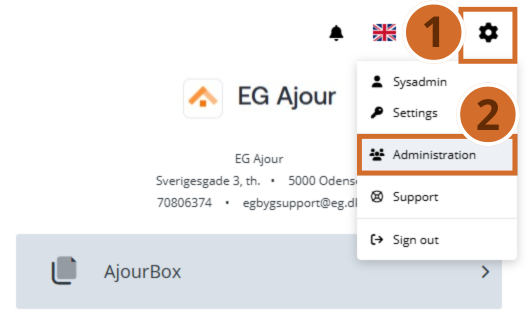
Step 1. – Click the “Gear icon”, which is always located in the top right of the screen.
Step 2. – Click “Administration”
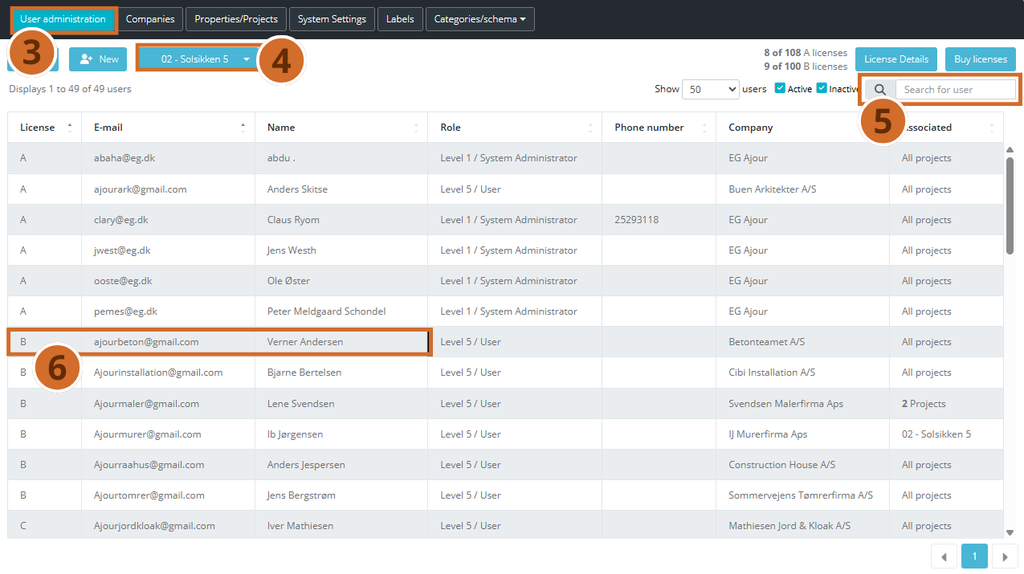
Step 3. – Select the “User administration” area, which is also the area you are automatically shown when you open “Administration”
Step 4. – You can filter for the user via the “Select project” button, and select the project the user is linked to.
Step 5. – If you cannot see the desired user in the displayed overview, the quickest way is to search for the user via the search field. The system starts searching as soon as you type the first letter.
The system’s search shows all users that contain the letters you enter, regardless of whether the letters are part of the user’s first name, last name or e-mail.
Step 6. – Click the desired user.
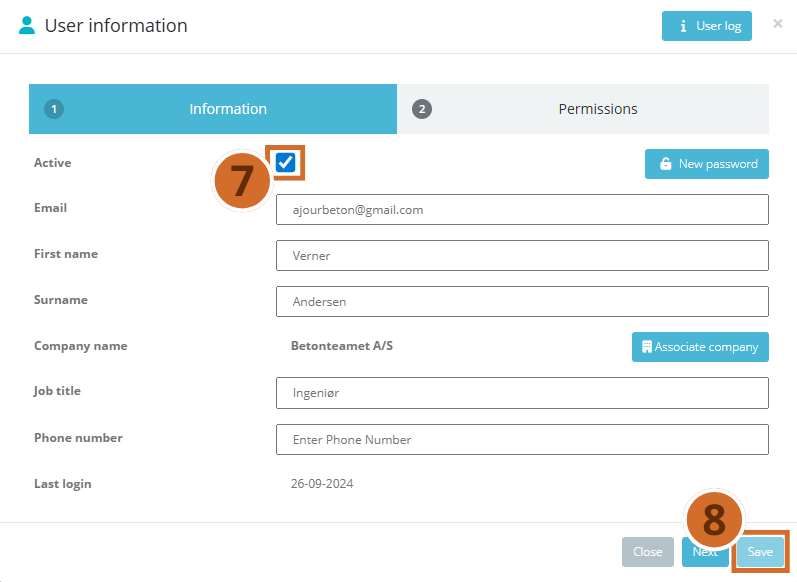
Step 7. – Clear the checkmark in the “Active” checkbox.
Step 8. – Finish by clicking the “Save” button.
The user is now inactive, and will not be able to log in to the system or receive e-mails from the system about updates on the projects the user has been linked to.
Deactivating users requires administrator permissions (System or Project Administrator). See our guide “User permissions in EG Ajour” if you need to add these permissions to a user.