
Skip to content
EG Ajour Help

EG Ajour Help

  • Guides
  • English
  • Dansk
EG Ajour Help
EG Ajour Help

Administration

18
  • Access request
  • Administration module
  • Archive/Deactivate, activate or delete a project
  • Buy licenses (Add-on purchase)
  • Change the e-mail address of an existing user
  • Create a new user
  • Create project
  • Deactivate user
  • Edit project information
  • Explanation of license types
  • Give an existing user access to a project
  • Merge two companies
  • Remove a user from a project
  • Resend activation mail and New password
  • Role standards
  • Share your license with other Ajour systems
  • The User Settings menu
  • User permissions in EG Ajour
View Categories
  • Home
  • Docs
  • Administration
  • Change the e-mail address of an existing user

Change the e-mail address of an existing user

< 1 min read

0:00 / 0:59
  • View as Markdown Open this page as plain Markdown (opens in a new tab)
  • Open in ChatGPT Ask questions about this page (opens in a new tab)
  • Open in Claude Ask questions about this page (opens in a new tab)
  • Open in Google AI Studio Ask questions about this page (Google account required) (opens in a new tab)

This article describes how to change a user’s e-mail address.

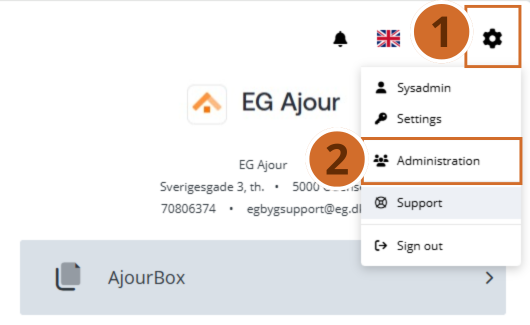
Step 1. – Click the “Gear icon” in the top left of the screen

Step 2. – Select “Administration” – You are taken to a new page.
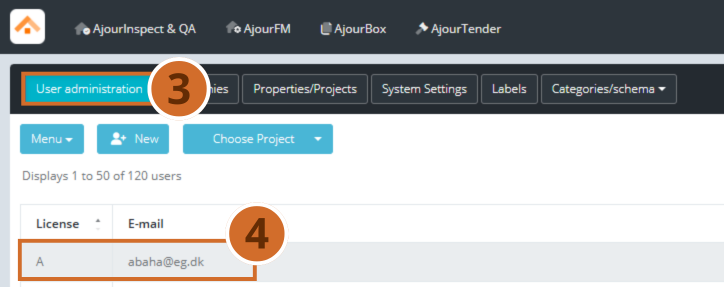
Step 3. – Select the “User administration” area

Step 4. – Search for the user in the list of all users, and click the desired user – A pop-up window opens.
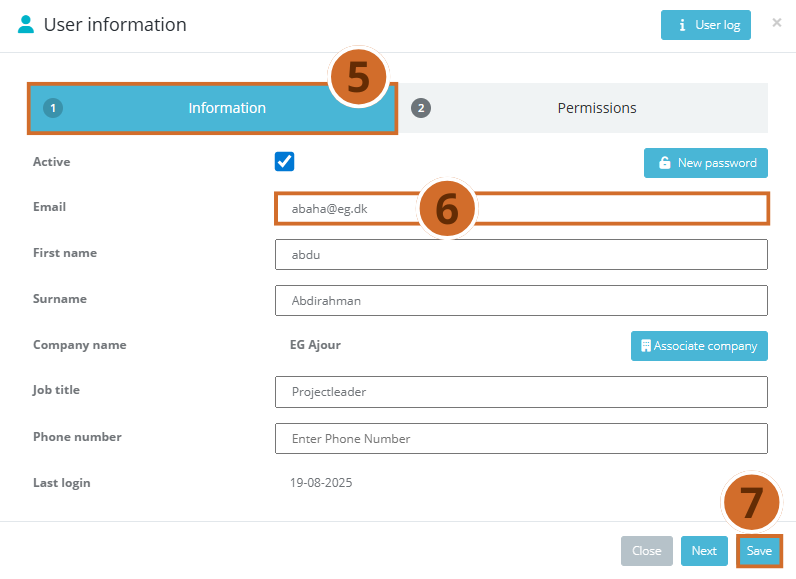
Step 5. – Select the “1 Information” area

Step 6. – In the “E-mail” field, enter the new e-mail address you want to change it to.

Step 7. – Finish by clicking the “Save” button.
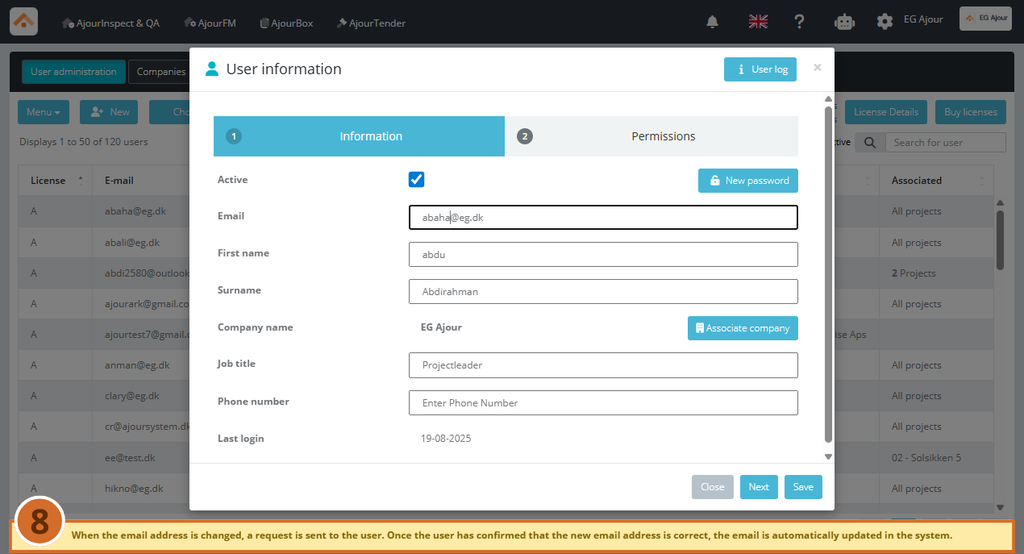
Step 8. – A pop-up message appears at the bottom of the screen, stating that an e-mail has been sent to the new e-mail address.

Before the change takes effect in the system, the user must confirm the change via the e-mail that was sent.

When the user has confirmed, the e-mail address is automatically changed in the system.

This action requires permissions corresponding to the roles: System Administrator and Project Administrator. Or that you, as a user, have project permissions for Account.
What are your Feelings

  • Happy
  • Normal
  • Sad
Buy licenses (Add-on purchase)Create a new user

Powered by BetterDocs

Leave a Reply Cancel reply

Your email address will not be published. Required fields are marked *

© 2026 EG Ajour Help

  • Guides
  • English
  • Dansk